One platform for the Canadian benefits firm

The carrier already did the math. We check it.

blankit runs the analytical side of a Canadian benefits practice: reprice carrier renewals, take clients to market, generate branded claims reports, and answer anything about any file — all under your firm’s brand, all hosted in Canada.

Your email sets up the walkthrough — no marketing list, no sharing.

Renewal analysisSample data

Fair renewal summary

Humberview Manufacturing · renewal, effective 1 Jan

Carrier ask

+16.4%

$565,704 / yr

Fair renewal

+2.1%

$496,206 / yr

HealthChallenged
DentalChallenged
Life & AD&DAs proposed
LTDAs proposed
$69,498 a year back on the table.
The platform

Four surfaces do the heavy lifting.

Each shares one client record and one brand, so a renewal, a marketing exercise, and a claims report all speak the same language.

Renewals

Reprice any carrier renewal against a defensible fair premium.

Upload the carrier's own renewal — a PDF, an experience workbook, or photographed pages — and blankit reprices every benefit line against a fair premium the file actually supports — then records both sides of the negotiation, every counter you put back and every revision they sent, so the client's renewal document shows the work, not just the result.

See a sample analysis
NegotiationSample data

The exchange, both sides

Humber Trailworks Ltd. · Health & Dental challenged

  1. Carrier opened+14.2%
  2. We countered+4.8%
  3. Carrier revised+9.1%
  4. We countered+6.0%
  5. Settled+6.4%

Positions land on the trail as you work — yours when the challenge goes out, theirs when the reply is forwarded in — and all of it prints in the client’s renewal document.

Marketing

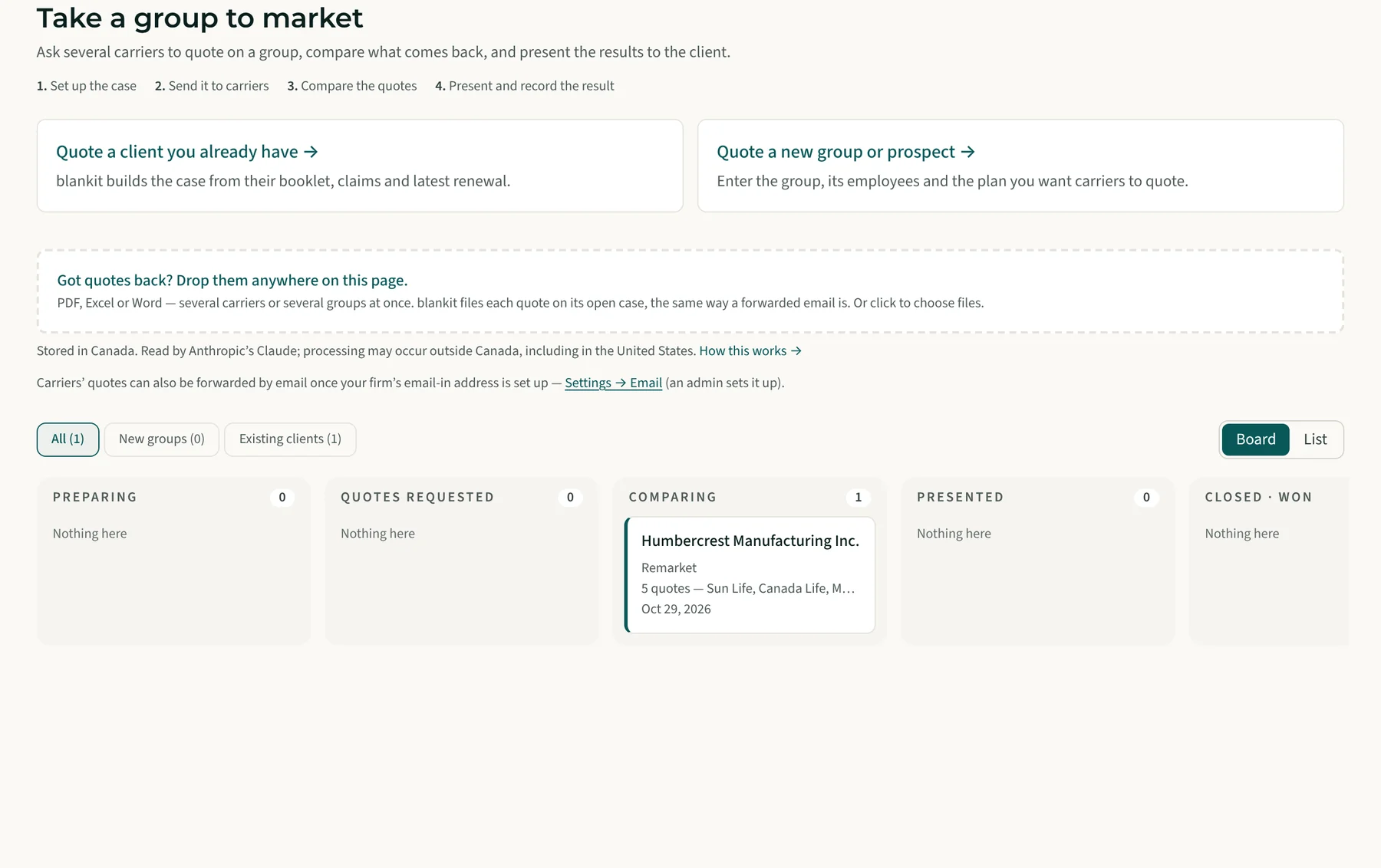
Take a client — or a group you haven’t signed — to market.

Add a prospect the day you hear about them and every quote case hangs off that record, so where they stand comes from the market, not a stage you keep updating. Drop in the employer’s files — the census maps its own columns, Life written as “2 × annual earnings” is computed per member. Each carrier gets one firm-branded RFQ; forward their reply and the covering email is read alongside the attachment, so a target loss ratio or rate guarantee stated only in the note still lands on the quote. Every quote comes back with its caps, guarantees and footnotes, and any carrier off the requested design is flagged rather than passed off as the cheaper number. Out comes a client-ready Benefits Presentation — and when they sign, the prospect converts with its quote history attached.

How quoting works
Quote comparisonSample data
CarrierMonthlyvs currentStatus
Carrier A$41,120−7.9%Leading
Current carrier$44,650Renewal
Carrier B$46,010+3.0%Received
Carrier CDeclined to quoteClosed

The grid stays editable right up to the presentation.

Claims

Claims reports that land the same day the data does.

Branded, interactive claims reports across every year on file — the drivers, the trends, and where the spend goes by claim type and practitioner. Forward the carrier’s report by email and the finished document comes back to your inbox.

See a sample report
Claims experienceSample data

Paid claims by period

Health · three policy years

2023–24
2024–25
2025–26
Copilot

Ask anything about any client. Get a cited answer.

Rider reads the booklet, the renewal history, and the claims file — and answers in plain language, in English or French, with the source attached. It drafts the follow-up too.

Meet Rider
RiderSample data

What did we settle Humber Trailworks at last year, and what drove it?

Settled at +5.2% against an opening ask of +11.8%. Dental drove the ask — two high-cost periods — but the health pooling charge came down after the challenge.Source: Renewal · Nov 2025
And the rest of the practice

Everything else, quietly handled.

Practice

Pipeline & Calendar

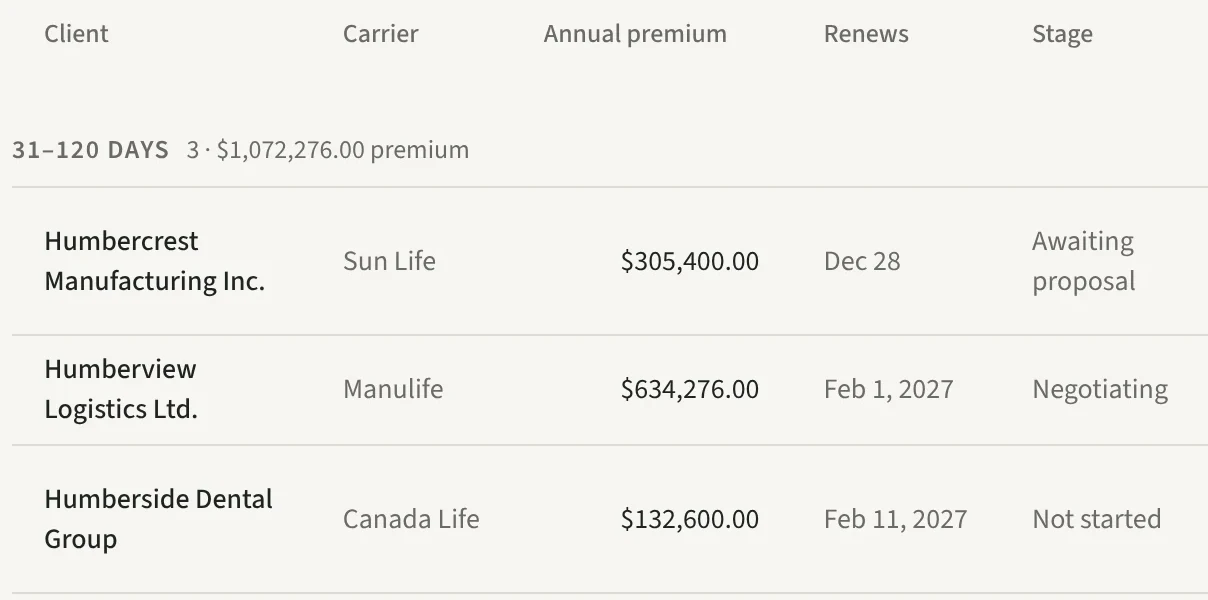
Every renewal on one timeline — what’s due, what’s out to market, what’s waiting on a carrier — plus how the whole book renewed, by line.

Benchmarking

Plan Design Score

Score a plan against comparable client plans — same industry, province and size — and against Canadian market standards. Optional: left off, the report still names each shortfall and what peers carry.

Comparisons

Claims Mix vs All Plans

How this group’s health and dental spend splits, beside every plan sponsor on the platform — so you can say whether they run high on massage or low on drugs. Your own dashboard opens with the same comparison across your whole book. Anonymized aggregates drawn from at least three firms and five plan sponsors; withdraw at any time.

Plan design

Plan Change Modelling

What a coinsurance step, a paramedical cap or mandatory generic substitution would have done to this group’s own claims — as a range, every assumption stated. Only the carrier can price a change; this is how you decide which to ask for.

Disability

EI Premium Reduction

Any plan with short-term disability can qualify the employer for Service Canada’s Premium Reduction Program — EI premiums at a reduced multiple instead of 1.4×. The renewal report says what it’s worth this year, the five-twelfths owed back to employees, and whether the plan meets the program’s six tests. Rates refresh each September; the dashboard shows the opportunity across the book.

Funding

ASO Funding Comparison

What this group would pay self-funding health and dental instead of renewing insured — claims, fees, stop-loss and taxes on both sides, beside the carrier’s ask, with the claims level where the two cost the same. ASO savings depend on claims and are never guaranteed; the comparison says so beside every figure.

Guides

Workflow Guides

Step-by-step guides for the repeatable work — announcements, plan amendments, onboarding. Rider pre-fills as you go; each ends in client-ready PDF and Word.

Clients

Client Dashboard

Open a group and see where it stands: the renewal in flight, what the plan costs, how claims are trending, and every year of history behind it.

Client records

Province, Filled In For You

Province decides how a renewal is priced — Quebec carries the RAMQ carve-out and the QIP pooling layer — and what the benefits site must publish in French. blankit reads it off the carrier renewal and checks the company against the public registers it mirrors — Corporations Canada and the Registraire des entreprises du Québec. Agreeing sources settle it; disagreeing ones settle nothing and say so. Confirm it once and nothing touches it again.

Onboarding

Renewal History Import

Taking over a book? Import past years’ settled renewals — carrier ask, outcome, savings — so day one starts with real history.

Mid-year

Coverage Changes

A client adds vision or bumps dental mid-year: describe the change and blankit asks the incumbent to price it, chases the answer, and turns their reply into a branded pricing summary.

Commissions

Commission Reconciliation

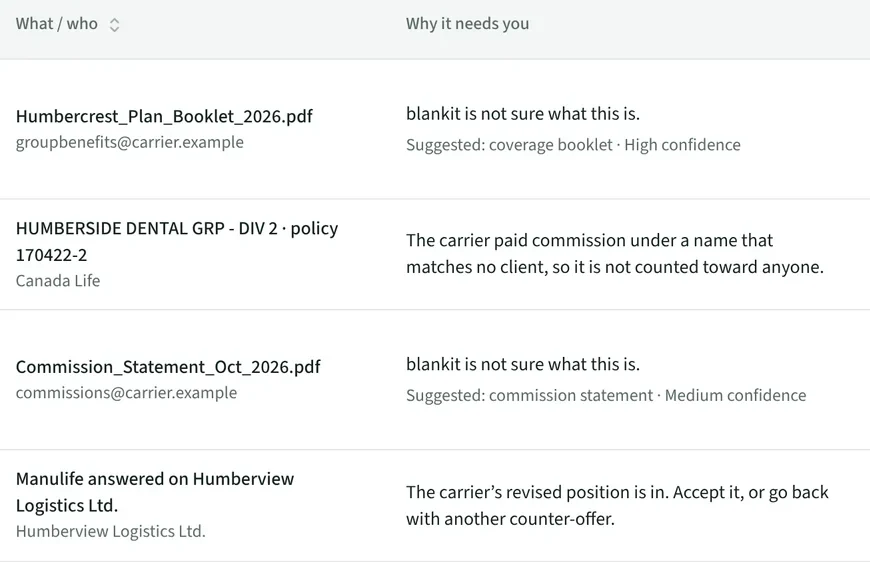
Set expected rates per carrier or client — flat, fixed-dollar, or a graded scale. Forward the carrier’s statement and see paid reconciled against owed, with shortfalls and missing groups flagged.

And the tooling around them — risk profiling, carrier scorecards, carrier emails, and optional sync with the CRM you already use.

One client record

Everything the practice knows, in one place.

Booklets, renewal history, claims periods, quotes, commissions, tasks — every surface reads and writes the same record, so nothing lives in someone’s folder and nobody digs for what happened at last renewal.

HealthDentalRenewal historyLife & AD&DPooling chargeClaims periodsFair premiumLTDBookletRate guaranteesCensusCarrier contacts
Quotes out to marketNegotiation roundsCommissionsPlan amendmentsWaiting periodsVerified savingsRenewal calendarEmployee countsPrior carrierOpen tasks

Rider works the record, not just reads it.

Concrete tasks, done in the chat — always proposed first, applied only when you approve.

  • Draft the challenge email for this renewal
  • What pooling charge did the carrier load?
  • Rebuild the one-pager with the round-2 counter
  • Which clients renew in the next 90 days?
  • Summarize the dental experience, last three years
  • Start a mid-year vision quote for this client

What leaves your firm

What your clients and carriers actually open.

Fair Renewal one-pager

Fair Renewal one-pager

The carrier-facing summary: incurred claims, net premium, and the fair renewal position, stated line by line.

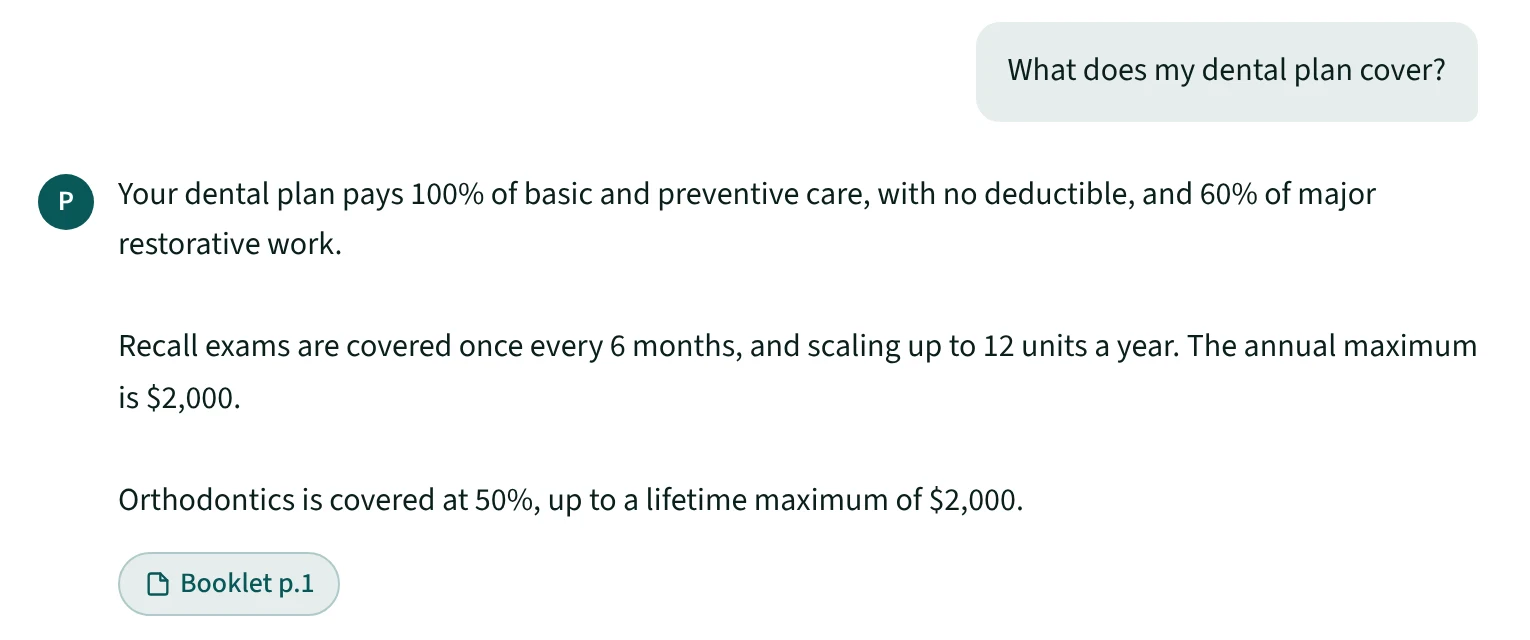
Employee benefits chatbot

Employee benefits chatbot

Booklet-grounded Q&A for plan members, white-labelled to the employer.

Critical illness enrolment

Critical illness enrolment

Plan members buy supplemental CI coverage in minutes, with carrier-bound rates.

How we arrive at a fair premium

The carrier sends one number. We rebuild it.

A renewal letter is a single premium with the working shown off-page. blankit rebuilds it from the group’s own claims and stops at the premium the file actually supports — every move a recognized Canadian actuarial method, every figure shown line by line in the report you hand back.

And when the rebuilt number lands at or above what the carrier asked, blankit says so — that line’s increase is defensible on the carrier’s own methodology. A tool that finds every renewal excessive is not an analysis, and the underwriter across the table already knows it.

See the full actuarial walk
Humberview ManufacturingSample walk

Four corrections to the carrier’s number

  1. Pool out the large claims

    The catastrophic claimant leaves the experience — that risk is exactly what the pooling charge already buys — and the standard pool charge goes back in its place. For a Québec group the RAMQ premium and the QIP pooling layer come out alongside it; neither is group risk.

  2. Complete and trend the claims

    Add the claims incurred but not yet reported, then project the experience forward to the new plan year.

  3. Blend for credibility

    Weight the group’s own experience against the carrier’s manual by how much data there actually is — small groups aren’t over-read, large ones get full weight. A carrier that credits your client’s record less than the standard doesn’t get to set that weight — and you can still set it yourself, which overrides both. The manual is last year’s rate at the carrier’s own trend, not the renewal they just asked for.

  4. Hold to the carrier’s own target

    Gross up to the target loss ratio the carrier itself prices to — not a benchmark we invented — so the fair premium is anchored to their book.

Where the walk stops is the fair premium — the one in the summary at the top of this page.
Where every figure comes from

Nothing silently defaults.

Target loss ratio and IBNR are never defaulted. If a required figure is missing, blankit stops and asks rather than quietly assuming one. Synthesized inputs are footnoted. And where an advisor adjusts something themselves — arguing a one-time claim out of the experience, say — the carrier is shown the amount and the reason, never a claims figure that quietly shrank.

1The carrier’s disclosures — used exactly as stated
2Your booklet library — from booklets, carrier documents, or manual entry
3Platform fallbacks — last resort, always flagged
Slack and Outlook

Send the renewal from wherever you already are.

Not a notification feed — the actual work. Drag a carrier renewal into a Slack channel — or send it straight from your inbox with the Outlook add-in — and it is treated exactly as if you had uploaded it, with the result coming back to you. Ask it about any client while you’re there.

  1. Send

    Share the carrier renewal in the channel your team already uses, or send it from Outlook without leaving the email.

  2. Read

    blankit picks it up, extracts the experience, and runs the engine.

  3. Reply

    The analysis comes back to you, linked to the draft in your pipeline.

Your own AI

Or ask the assistant you already have open.

Connect your own AI assistant to blankit and “pull up Humber Freight’s renewal and tell me what they should actually be paying” becomes a sentence you say. It isn’t a chatbot guessing at benefits — it runs the same engine every other surface runs, on your real book. Where Rider works inside blankit with no setup, this brings blankit to the assistant you already use.

What it can touch

  • You grant the permissions

    Reading only, or reading and writing. Saving an analysis, changing assumptions and starting a quote are each off until you turn them on.

  • It cannot contact anyone

    No permission sends email to a carrier or a client. That stays something you do yourself, after reading what is going out.

  • Everything is written down

    Every request lands in your audit log, and revoking a key stops it working immediately.

Setup is three steps and installs nothing: create a key, paste it into your assistant, ask it to name your clients.

Benefits microsites

The booklet you already read, as a site their staff can.

You extract a client’s plan design to challenge their renewal. The same data makes a site that tells their employees what they’re actually covered for — in plain language, with Paige, the benefits assistant, there for the question the page doesn’t answer. When the plan changes, rebuild from the new booklet and every page updates itself — nothing quietly keeps quoting last year’s maximum.

Built from the booklet
Point at one already in the library. Every page comes from the plan design you extracted — nothing to write.
Thirteen languages
English and French automatically, plus eleven more. A language only goes live once it matches the current plan.
Behind an access code
On your firm’s domain, in your firm’s colours, with Paige waiting in the corner of every page.

A Quebec group cannot go live without French, and it cannot be taken away afterwards — the Charter of the French Language is enforced when the site publishes and again whenever its languages change, not left as a warning.

Optional critical illness

Coverage your clients’ staff can buy without leaving the chat.

Switch on the Blue Cross Life critical illness offer and Paige carries it: an employee asks what it costs, gets a quoted premium rather than a brochure, and applies without leaving the conversation — signing a health questionnaire first if they want one of the two upper tiers. The completed application goes to Blue Cross Life with you copied — and every one of them shows up on your dashboard, so you see the ones Blue Cross Life has come back to before the member chases you.

They ask Paige
The offer is a starter question in the assistant, in all thirteen languages. No form to find, no advisor to email.
$25k and $50k are Guaranteed Issue
No health questions. The application is complete the moment they finish the conversation.
$75k and $100k are signed first
A health questionnaire goes out for e-signature, and only a signed one becomes an application.

Optional, and off until you turn it on — a firm that doesn’t offer critical illness has an assistant that has never heard of it.

For advisors, brokerages & MGAs

Your name on everything. blankit stays invisible.

  • Fully white-labelled. Every report, one-pager, quote summary, and client portal flows through your firm’s name, logo, and colours.
  • One advisor or a hundred. Licensed per advisor, so an independent, a brokerage, or an MGA running its own team all work the same way — each advisor with their own book, strictly isolated.
OBOrchard Benefits
Client-ready

2026 Renewal Position

Extended Health & Dental · Policy #GRP-40218

Prepared for

Humberview Manufacturing

Prepared by

Orchard Benefits

Effective

1 Jan 2026

▲ your logo, name & colours — every document, letter-perfect

By the numbers

9lines

Every benefit line the plan carries reaches every deliverable — EHC, Dental, Life, Dependent Life, AD&D, Critical Illness, STD, LTD, and EAP. Including the ones the renewal left unchanged.

20yrs +

Of front-line advisor experience built into the methodology.

Security & data residency

Canadian data, kept in Canada.

Canadian AI

Read by Augure

Every document blankit processes — renewals, claims experience, booklets, carrier correspondence — is read by Augure, Canadian-owned AI running on Canadian infrastructure. No US parent company in the stack, and no carrier document leaving the country to be understood.

Data residency

Stored in ca-central-1

Carrier PDFs, extracted data, and generated documents are stored in AWS Montreal and stay in Canada end to end. Reading them happens at Augure, on Canadian infrastructure — see the card above.

Isolation

Your own database

Your firm’s data is not rows in a shared table kept apart by a filter. Every firm is provisioned its own database, its own storage bucket and its own encryption key — so a cross-firm read is not something the platform declines to do, it is something it has no route to attempt. That is how blankit is built, not a tier you buy.

Access control

Passkeys & enforced 2FA

Sign in with passkeys, TOTP, or email OTP — and require a second factor firm-wide. Passwordless where you want it.

Accountability

Built to be audited

Request-level logging on a hash-chained audit trail — altering or deleting history is detectable, not just discouraged — plus encrypted secrets and strict per-firm tenant isolation, designed against a SOC 2 control set.

Even we can't see your client list.

Your clients live in your firm's own database, which no other firm’s connection can address — and neither can ours, day to day. When our team steps into your firm to fix a problem, the session is read-only — we can't change a thing — and every client name is replaced by a fixed code: Client-A4F2, never Acme Corporation. Premiums, dates, and carriers stay visible so we can still trace the numbers, but who your clients are never reaches us. See exactly how on the Trust & security page.

Dashboard view during platform-admin impersonation. Red banner across the top warns 'Read-only impersonation. Writes disabled; client PII is masked.' The renewal hero below lists Client-AA03, Client-6CE9, Client-D1F8, Client-B6E9, and Client-DA8F — lives, renewal dates, and urgency stay visible.
Questions

The things advisors ask first.

Still wondering about something? Talk to us — a real person answers.

Do I need Salesforce or any specific CRM?

No. A CRM is optional and manual entry is the default. If you keep one, blankit connects to Salesforce, HubSpot, Microsoft Dynamics 365 and Zoho — matching your clients to the records already there and reading each renewal date onto your pipeline. It only reads by default, and disconnecting changes nothing in your CRM.

Which carriers and documents does it handle?

Canadian carrier renewal PDFs, experience workbooks and the covering email — read together and priced line by line. Where the email and the report disagree on a figure, the report wins and the difference is flagged. Photographed or scanned pages work the same way: send a JPEG or PNG and each page reads exactly as a PDF page does.

Can an MGA or a multi-advisor brokerage license it?

Yes. blankit is licensed per advisor, and a brokerage or MGA can run its whole team on one licence agreement under its own brand — every report, portal and microsite carrying the MGA’s name rather than blankit’s. Each advisor gets their own seat and their own book; the firm sees across all of them.

Does blankit track commissions?

Yes. Set expected rates per carrier or client — flat, fixed-dollar, or a graded scale (20% on the first CAD $25,000 of premium, 10% on the next CAD $25,000, 5% above), each rate applied only to the premium inside its own band. Forward a carrier statement, or have it sent straight to your firm’s commissions email-in address, and paid is reconciled against owed per group — shortfalls and missing groups flagged.

Who’s behind it
Chris Gory, founder of blankit
“I spent 20+ years challenging carrier renewals for my own clients. blankit is the tool I built to do it properly — now any advisor, brokerage or MGA can run it under their own name.”

Chris Gory · Founder & Principal Advisor, Orchard Benefits

See the whole platform

Run it on one of your own clients.

Bring one client — a renewal, a marketing exercise, a claims file. We’ll run it through blankit and show you the documents your client would see, in your firm’s branding.